Imagine spending weeks building a stunning personal website or a business blog. You write passionate articles, choose beautiful colors, and share the link with your family. Then, you open Google, type in your article’s core topic, and scroll through pages of results.
Page one. Page two. Page three. Your site is nowhere to be found.
This is an incredibly frustrating experience that almost every beginner faces. Often, the problem isn’t the quality of your ideas or your writing. Instead, you are likely falling into hidden traps known as common SEO mistakes.
Search Engine Optimization (SEO) can feel like a confusing maze of technical rules. However, learning how to optimize your web presence is one of the most transformative digital skills you can cultivate today. Understanding search logic is widely considered one of the top high-income skills in our web-driven economy because visibility equals revenue.
Whether you are a student building a portfolio, a beginner launching an e-commerce store, or a young professional developing vital skills for 2030 to secure lucrative future careers, avoiding these critical blunders will help you outrank the competition and grow your organic traffic safely.
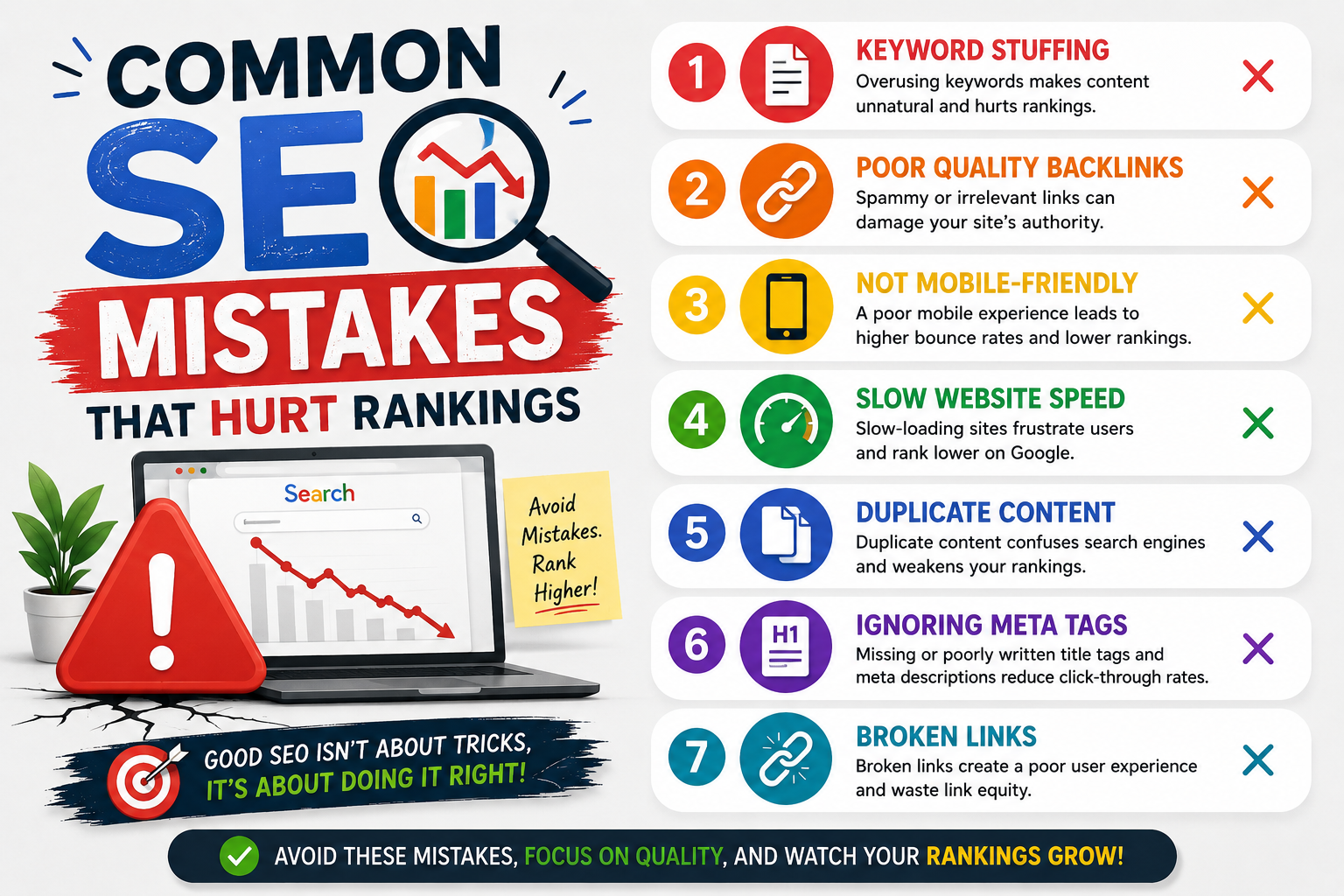
1. Falling into the Keyword Stuffing Trap
When beginners first learn about keywords, they often think: “If I repeat my target keyword fifty times in this short article, Google will definitely know what my page is about and rank me number one!”
This practice is called keyword stuffing, and it is a major mistake.
The Problem with Forced Keywords
Google’s algorithms use advanced machine learning models that read text exactly like a human does. If your sentences sound robotic, awkward, or repetitive because you are trying to force keywords into every line, Google will penalize your page. Keyword stuffing ruins the reading experience, causing human visitors to leave your site immediately.
- Bad Example (Keyword Stuffing): “If you want to learn future skills, our future skills course teaches you the best future skills for high-paying future careers.”
- Good Example (Natural Writing): “If you want to acquire valuable future skills, our structured training program will prepare you to excel in high-paying future careers.”
- Actionable Tip: Write your first draft naturally without worrying about search engine bots. Once you finish writing, go back and ensure your target keyword appears organically in your main title, your first paragraph, one subheading, and a couple of times within the body text. Keep your keyword density around 1% to 2% of your total word count.
2. Ignoring Search Intent: Writing What You Want vs. What Users Need
Another massive blunder is failing to understand “Search Intent.” Search intent is the hidden reason or motivation behind a user’s search query. Google tracks user behavior closely, and its entire goal is to give users the exact answer they want instantly.
The Disconnect
If a user searches for a quick step-by-step tutorial, but your page forces them to read a 3,000-word philosophical essay before giving them the answer, they will click the back button. This tells Google that your page failed to satisfy the search intent.
Let’s look at the four main types of search intent:
- Informational: Looking for education or guides (e.g., “how to learn coding online”).
- Commercial: Investigating options before spending money (e.g., “best laptop for college students”).
- Transactional: Ready to purchase a specific product right now (e.g., “buy iPhone 15 deals”).
- Navigational: Trying to find a specific website destination (e.g., “LinkedIn login”).
- Practical Example: If you target the keyword “best financial planning software,” you are dealing with commercial intent. Users want an objective, side-by-side comparison chart of multiple tools. If you write a post that only talks about your own single software program, your page won’t rank because it doesn’t match what the user is looking for.
- Actionable Tip: Before writing an article, type your target keyword into Google and study the top three results carefully. Are they step-by-step guides, listicles, product pages, or video tutorials? Give the audience the exact format they are looking for.
3. Disregarding Mobile Users and Page Loading Speed
We live in a mobile-first society. The vast majority of global web searches happen on smartphones and tablets. Yet, many beginners design their websites exclusively on large desktop screens, completely ignoring how their pages look on smaller mobile devices.
The Mobile-First Reality
Google uses mobile-first indexing. This means its automated crawling bots look at the mobile version of your website to determine your search rankings, rather than the desktop version. If your buttons are too small to tap, your text requires horizontal scrolling, or your menu breaks on a smartphone, your search visibility will crash.
The High Cost of Slow Loading Times
Our attention spans are shorter than ever. If your website takes more than three seconds to load, a massive portion of your hard-earned traffic will abandon your site before it even opens.
- Common Causes of Slow Websites:
- Uploading massive, raw image files straight from your smartphone or camera.
- Using cluttered, poorly coded website themes.
- Overloading your platform with too many unnecessary tracking tools and plugins.
- Actionable Tip: Run your URL through Google’s free PageSpeed Insights tool. It will give you a clear score out of 100 for your mobile performance and tell you exactly what is slowing down your page. Compress every single image using free compression tools like TinyPNG before uploading it to your site.
4. Neglecting Internal Linking and Site Architecture
Think of your website as a physical house. Internal links are the doorways and hallways that connect the rooms together. If a room has no door, nobody can enter it.
Many bloggers publish an article, promote it once on social media, and then completely forget about it. They never link to it from their other articles. This creates what SEO professionals call an “orphan page.” Search engine bots struggle to discover orphan pages, which means they rarely get indexed or ranked.
                  [The Topic Cluster Architecture]
                        ├── Core Pillar Page
                        │    ├── Supporting Article 1 ◄──► Internal Link
                        │    ├── Supporting Article 2 ◄──► Internal Link
                        │    └── Supporting Article 3 ◄──► Internal Link
- Practical Example: If you write a major pillar page titled “The Ultimate Guide to High-Income Skills,” you shouldn’t leave it isolated. Every time you write a smaller article about a specific career—like a post on digital skills or cloud engineering—you must include a contextual internal link back to your main pillar page.
- Actionable Tip: Create a regular habit of updating your content library. Every time you publish a new blog post, find three or four older, relevant articles on your site and add a natural link pointing toward your new page.
5. Creating Thin or Low-Value AI-Generated Content
With the rise of generative artificial intelligence, it has become incredibly easy to generate a 1,000-word article in less than thirty seconds. This has led many beginners to flood the internet with generic, automated content.
This is a dangerous strategy. Google’s core quality systems are explicitly designed to find and filter out low-effort, shallow content. Google values real-world human experience, unique perspectives, and factual trustworthiness.
The AI Tell-Tale Signs
Raw AI content often sounds highly repetitive, uses predictable buzzwords, and lacks original thoughts or personal stories. If your content looks identical to every other generic article on the web, Google has zero reason to rank your page over an established site.
- Actionable Tip: Treat AI tools as a helpful assistant rather than a primary author. Use them to brainstorm article outlines, fix grammar issues, or summarize long research data. When it comes to writing the actual post, ensure you add your own voice, personal anecdotes, unique screenshots, or real-world case studies that prove you have first-hand experience with the topic.
Conclusion: Turning SEO Pitfalls into Your Greatest Weapon
SEO is not a series of mysterious secrets or tricky workarounds to fool Google. It is a structured framework centered on user experience. Google simply wants to reward clean, fast, and highly reliable websites that give readers exactly what they are searching for.
By avoiding the temptation to stuff keywords, aligning your content with search intent, optimizing your mobile layout, linking your pages intelligently, and focusing on high-quality human perspectives, you build an unshakeable digital asset. Treat search engine optimization as a vital technical competency. Avoid these common mistakes, look at your website analytics data regularly, and watch your organic traffic scale naturally over time.
Frequently Asked Questions (FAQs)
Q1: Is it bad for my SEO rankings if I go back and edit my old blog posts?
A1: No, updating your older content is actually one of the best ways to boost your search rankings. Google loves fresh, up-to-date information. If you update an old article with new statistics, fix broken links, and add deeper insights, Google will crawl your page again and often reward you with higher rankings.
Q2: What are backlinks, and do I need them to rank on page one?
A2: A backlink occurs when an entirely external website places a link on their page pointing back to your site. Think of it as a digital vote of confidence. While you can rank for low-competition long-tail keywords without many backlinks, earning links from trusted, authoritative websites is essential to rank for highly competitive, high-traffic search terms.
Q3: What is the difference between an H1, H2, and H3 heading tag?
A3: These tags create a logical visual hierarchy on your page. The H1 tag is your main book title (use only one per article). H2 tags act as your main chapters or major subheadings. H3 tags are nested sub-points inside an H2 chapter to break down complex lists or steps even further.
Q4: Does Google penalize websites that have a high bounce rate?
A4: A high bounce rate means a visitor clicked on your link and left your site almost immediately without interacting with any other pages. While bounce rate itself isn’t a direct algorithm ranking factor, a high bounce rate often indicates that your page has slow loading speeds, poor formatting, or fails to match the user’s search intent.
Q5: Can a brand-new blog outrank an established corporate website?
A5: Yes, it is entirely possible if you choose a hyper-focused strategy. Massive corporate sites usually write broad, generic articles. If you focus your blog on a narrow niche and write the absolute best, most comprehensive, and most practical guide for a specific long-tail keyword, Google’s helpful content system will often rank your specialized page above a generic corporate site.